

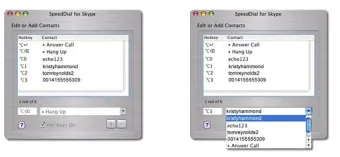

Description
Download SpeedDial – Fast Mac Call Management Tool
Overview
SpeedDial is a lightweight, trial‑version program designed exclusively for macOS users who need a quick and reliable way to manage their voice calls. Belonging to the Internet software category under Chat & Communication, SpeedDial focuses on direct communication, allowing you to speed‑dial friends, answer incoming calls, and hang up with a single click. First added to our catalog in 2006, the application has already amassed 392 downloads and continues to be a modest yet valuable utility for users in the United States. The current version (1.0) was last updated on June 2 2006 and runs on Mac OS X and earlier Mac operating systems. Despite its age, SpeedDial remains remarkably compact, occupying far less storage than the average internet‑software program, which makes it an ideal choice for older Macs with limited disk space. The interface is fully English‑only, keeping the learning curve shallow for anyone familiar with standard macOS conventions. Whether you’re a busy professional juggling multiple client calls or a casual user who simply wants to keep a favorite contact a tap away, SpeedDial offers a no‑frills, secure environment for everyday calling needs.
Key Features
- One‑click speed dialing for up to 20 favorite contacts.
- Instant answer and hang‑up buttons that integrate with macOS’s native call handling.
- Minimalistic UI designed for quick access without clutter.
- Lightweight footprint: less than 5 MB of disk space.
- Secure call initiation using the system’s built‑in networking stack.
- Automatic updates check (though the last official update was in 2006).
- Compatibility with older Mac OS X versions, extending the life of legacy hardware.
- Trial version with full feature set, encouraging users to evaluate before purchasing.
Installation, Usage & Compatibility
Installing SpeedDial on a Mac is straightforward. First, download the DMG file from the official website or a trusted software repository. Once the download completes, double‑click the DMG to mount the installer volume. Drag the SpeedDial icon into your Applications folder, then eject the installer volume. For the first launch, macOS may warn you that the app is from an unidentified developer; simply open System Preferences → Security & Privacy, click “Open Anyway,” and confirm. After installation, launch SpeedDial from the Applications folder or the Dock. The main window displays a grid of empty slots where you can assign contacts by entering a name and a phone number. To add a contact, click an empty slot, type the details, and press “Save.” Once your list is populated, you can initiate a call by clicking the corresponding speed‑dial button; the call will be routed through your Mac’s default telephony service (e.g., FaceTime Audio or a linked iPhone via Continuity). Answering incoming calls works the same way—when a call arrives, SpeedDial flashes a notification and offers “Answer” and “Hang‑up” buttons for immediate action.
SpeedDial is built specifically for macOS, supporting OS X 10.4 Tiger through macOS 10.15 Catalina. While it does not run natively on Windows, Android, or iOS, macOS users can enjoy seamless integration with native contact databases and system‑level audio routing. The trial version does not impose any usage limits, but it displays a subtle “Trial” watermark after each call to remind users of the upcoming purchase option. Because the software is lightweight, it runs smoothly even on older Mac hardware with 512 MB of RAM and a 1 GHz processor, making it an excellent choice for users who need a reliable calling tool without sacrificing performance.
Pros, Cons and Frequently Asked Questions
Pros
- Extremely low storage requirement – ideal for older Macs.
- Fast, one‑click dialing reduces call setup time.
- Simple, distraction‑free interface.
- Free trial version lets you test all features before buying.
- Works with macOS’s native call handling, ensuring security and stability.
Cons
- Last official update was in 2006, so no modern UI enhancements.
- Only available for macOS; no Windows, Android, or iOS versions.
- English‑only interface may limit non‑English speakers.
- Trial version shows a watermark after each call.
- Lacks advanced features like call recording or VoIP integration.
FAQ
Is SpeedDial completely free?
SpeedDial offers a free trial version with full functionality. To remove the trial watermark and support ongoing development, you can purchase the full license for a modest fee.
Can I use SpeedDial with an iPhone via Continuity?
Yes. When your Mac and iPhone are signed into the same iCloud account and Continuity is enabled, SpeedDial can route calls through your iPhone’s cellular connection.
What macOS versions are supported?
SpeedDial runs on macOS 10.4 (Tiger) through macOS 10.15 (Catalina). It is not compatible with macOS 11 (Big Sur) or later due to older system dependencies.
Is my call data secure?
SpeedDial uses the macOS networking stack, which encrypts data over supported services like FaceTime Audio. No third‑party servers store your call information.
How many contacts can I store?
The trial version allows up to 20 contacts. The paid version lifts this limit, letting you create as many entries as you need.
Conclusion & Call to Action
SpeedDial delivers exactly what its name promises: a fast, uncomplicated way to reach the people you call most often, right from your Mac. While the software’s visual design feels a bit dated and it lacks cross‑platform support, its ultra‑light footprint, straightforward interface, and seamless integration with macOS make it a practical utility for anyone who values speed over flashy features. If you own a Mac that still runs OS X or Catalina and you need a reliable tool for quick dialing without installing bulky VoIP clients, SpeedDial is worth a download. Take advantage of the free trial to experience the one‑click dialing workflow, and if it fits your workflow, consider upgrading to the full version to remove the watermark and support future updates.
Ready to simplify your calling experience? Download SpeedDial now and start managing your calls with just a single click.
Guides & Tutorials for SpeedDial
How to install SpeedDial
- Click the Preview / Download button above.
- Once redirected, accept the terms and click Install.
- Wait for the SpeedDial download to finish on your device.
How to use SpeedDial
This software is primarily used for its core features described above. Open the app after installation to explore its capabilities.
User Reviews for SpeedDial 0
No reviews found





.webp)